Sage Bank feeds mapping
Write bank transaction data into your customers' accounting software with an automated feed.
Our Sage Bank Feeds integration requires an authorization UI to authenticate an SMBSMB The primary customer segment that Codat helps businesses serve, typically companies with annual revenues under $500 million. user prior to creating source accounts within Codat.
Process
The process for mapping a source account with Sage Bank FeedsBank Feeds A Codat product that enables automatic synchronization of bank transaction data into a company's accounting software. begins within Sage. From there, users are directed to a hosted login page where they should enter their credentials, and you should verify their identity.
Upon successful authentication, you should then create the company, dataConnection, and source accounts within Codat. Once Sage verifies these details, the bank feed for your companyCompany In Codat, a company represents your customer's business entity. Companies can have multiple connections to different data sources. will become active.
Sage redirect
When your customer attempts to establish their bankfeed from Sage, they will be redirected to your hosted page through a linkLink The authorization flow that allows end users to connect their accounting, banking, or commerce platforms to your application via Codat. that is constructed as follows:
https://{authorizationRedirectUrl}?authorizationId={authId}&redirectUri={redirectUri}
- The
authorizationRedirectUrlis the web app URL that you configured in the Codat Portal for the Sage Bank FeedsBank Feeds A Codat product that enables automatic synchronization of bank transaction data into a company's accounting software. integration. - The
authIdis the unique authorization identifier for the companyCompany In Codat, a company represents your customer's business entity. Companies can have multiple connections to different data sources., this will be supplied by Sage and will be required when creating the dataconnection. - The
redirectUriis the URI the SMBSMB The primary customer segment that Codat helps businesses serve, typically companies with annual revenues under $500 million. user will be redirected to after authentication through your web app, this will also be supplied by Sage.
Hosted login page
CompanyCompany In Codat, a company represents your customer's business entity. Companies can have multiple connections to different data sources. verification
To ensure a seamless identity verification experience for the companyCompany In Codat, a company represents your customer's business entity. Companies can have multiple connections to different data sources. when they land on your hosted login page, your interface should accomplish the following tasks:
-
Parameter Retrieval: Capture the
authIdandredirectUriparameters that Sage provides when it redirects users to your hosted page. -
iframe Compatibility: Given that your page will appear in an iframe within Sage's platform, include a "Content-Security-Policy" header set to
frame-ancestors 'self' https://*.Sagebankdrive.com https://*.Sage.com https://*.intacct.com https://*.Sageone.comto make sure it functions properly within the Sage iframe. -
User Verification: Implement a form on the interface that can securely validate the credentials entered, thereby verifying the identity of your user.
-
Post-Authentication Redirect: Once the user successfully authenticates, redirect them to the
redirectUriinitially provided by Sage.
Connect the companyCompany In Codat, a company represents your customer's business entity. Companies can have multiple connections to different data sources.
Once you have verified who the CompanyCompany In Codat, a company represents your customer's business entity. Companies can have multiple connections to different data sources. is, you should then create the companyCompany In Codat, a company represents your customer's business entity. Companies can have multiple connections to different data sources., dataConnection and source accounts in Codat, you can follow the same steps outlined in setup.
For Sage bank feedsBank Feeds A Codat product that enables automatic synchronization of bank transaction data into a company's accounting software., an extra step is required to authorize the connectionConnection A link between a Codat company and a data source (like an accounting platform). Each connection represents authorized access to pull or push data from that platform.. This involves utilizing the authId provided by Sage, which can be included in an update request to the dataconnection.
- Request URL
- Request Body
Authorize data connectionConnection A link between a Codat company and a data source (like an accounting platform). Each connection represents authorized access to pull or push data from that platform. request URL
PUT company/{companyId}/connections/{connectionId}/authorization
Sample request body:
{
  "authorizationId": "ae6b6e5d-4634-4087-80e3-b04ecafb0cf7"
}
If your request responds with a 200 response status code, the next step is to redirect the companyCompany In Codat, a company represents your customer's business entity. Companies can have multiple connections to different data sources. to the given redirectUri, appending the authId as a query parameter.
{redirectUri}?state={authId}

// Example:

redirect_uri=https://snd01eu.Sagebankdrive.com/api/v1/indirectredirect/11111-22222-33333-88888-9999?state=1122-3344-5566-7788
Establish the bank feed
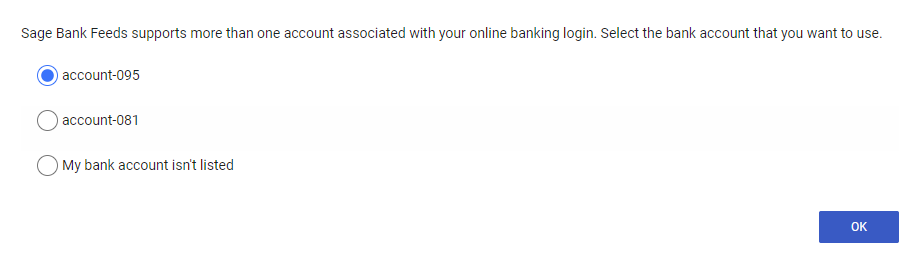
Once the connectionConnection A link between a Codat company and a data source (like an accounting platform). Each connection represents authorized access to pull or push data from that platform. is successfully set up, Sage will show a dialog box featuring a list of available source bank accounts that can be linked to initiate bank feedsBank Feeds A Codat product that enables automatic synchronization of bank transaction data into a company's accounting software..
For example:
The dataConnection status will then change to linked, and which point you will be able to write bankTransactions.