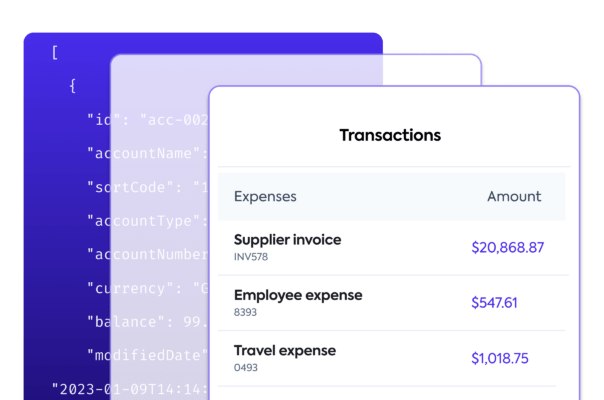
This tutorial focuses on reconciling bank feedsBank Feeds A Codat product that enables automatic synchronization of bank transaction data into a company's accounting software. with QuickBooks Online (QBO), and uses our Bank FeedsBank Feeds A Codat product that enables automatic synchronization of bank transaction data into a company's accounting software. client library. The Bank FeedsBank Feeds A Codat product that enables automatic synchronization of bank transaction data into a company's accounting software. library is available in C#, TypeScript, Python and Go.
Summary
🎯 Our QuickBooks Online Bank FeedsBank Feeds A Codat product that enables automatic synchronization of bank transaction data into a company's accounting software. integration makes it possible for your customers to connect bank accounts from your application to QBO. See how you can support your users by syncing their bank transaction data to QBO Bank FeedsBank Feeds A Codat product that enables automatic synchronization of bank transaction data into a company's accounting software., ensuring the records match each other.
⏳ Estimated time to review: 10-15 minutes
Why reconcile bank transactions
Traditionally, bank reconciliation is done by comparing a bank statement to the ledger entries. However, outdated methods like manual data processing and screen scraping no longer satisfy SMBsSMB The primary customer segment that Codat helps businesses serve, typically companies with annual revenues under $500 million.' demand for efficient, effortless processes.
Help your SMBSMB The primary customer segment that Codat helps businesses serve, typically companies with annual revenues under $500 million. customers syncSync The process of fetching the latest data from a connected data source. Syncs can be triggered manually or run automatically on a schedule. their bank statements digitally to their accounting software and automatically reconcile transactions, therefore removing manual effort, reducing potential for errors, and facilitating transaction matching.
This saves your customers time and gives them the context they need to properly analyze and optimize their spend.
Solution overview
We have done the heavy lifting for you by building bank feedsBank Feeds A Codat product that enables automatic synchronization of bank transaction data into a company's accounting software. integrations with a standardized data model to the accounting software your customers already use. This gives you access to real-time data that you can fetch, create, or update to support your customers. In this tutorial, we focus on our QuickBooks Online Bank FeedsBank Feeds A Codat product that enables automatic synchronization of bank transaction data into a company's accounting software. integration.
-
Make sure you have enabled the QuickBooks Online Bank FeedsBank Feeds A Codat product that enables automatic synchronization of bank transaction data into a company's accounting software. integration. You can do that in the Codat Portal, or read more for detailed instructions.
-
Intuit must have approved your companyCompany In Codat, a company represents your customer's business entity. Companies can have multiple connections to different data sources. to appear in the QuickBooks Online bank selection screen. Submit a request to Codat so that we can organize this with Intuit on your behalf.
We also expect that your application has a UI that your SMBSMB The primary customer segment that Codat helps businesses serve, typically companies with annual revenues under $500 million. users interact with.
Preparation
Use our SDKs to easily implement the bank feedsBank Feeds A Codat product that enables automatic synchronization of bank transaction data into a company's accounting software. solution in your app. We strongly recommend utilizing our SDKs to make your build simple to implement and easy to maintain.
First, install the client library:
- C#
- TypeScript
- Python
- Go
dotnet add package Codat.BankFeeds
npm add @codat/platform
or
yarn add @codat/platform
pip install codat-bankfeeds
go get github.com/codatio/client-sdk-go/bank-feeds
Next, import the package and add your Base64 encoded APIAPI A set of rules and protocols that allows different software applications to communicate with each other. Codat provides APIs for accessing financial data from accounting, banking, and commerce platforms. key within an authorization header. You can copy your authorization header in the Developers section of the Codat Portal. In our example, we chose to call the client library bank_feeds_client.
- C#
- TypeScript
- Python
- Go
using Codat.BankFeeds;
using CodatPlatform.Models.Shared;

var bankFeedsClient = new CodatBankFeedsSDK(
    security: new Security() {
        AuthHeader = "Basic BASE_64_ENCODED(API_KEY)",
    }
);
import { CodatBankFeeds } from "@codat/bank-feeds";

const bankFeedsClient = new CodatBankFeeds({
  authHeader: "Basic BASE_64_ENCODED(API_KEY)",
});
from codat_bankfeeds import CodatBankFeeds
from codat_bankfeeds.models import operations, shared

bank_feeds_client = CodatBankFeeds(
    security=shared.Security(
        auth_header="Basic BASE_64_ENCODED(API_KEY)",
    ),
)
package main

import(
	"github.com/codatio/client-sdk-go/bank-feeds"
	"github.com/codatio/client-sdk-go/bank-feeds/pkg/models/shared"
)

func main() {
    bankFeedsClient := codatbankfeeds.New(
        codatbankfeeds.WithSecurity(shared.Security{
            AuthHeader: "Basic BASE_64_ENCODED(API_KEY)",
        }),
    )
}
Bank feedsBank Feeds A Codat product that enables automatic synchronization of bank transaction data into a company's accounting software. process flow
Solution walkthrough
Provide your users with a linkLink The authorization flow that allows end users to connect their accounting, banking, or commerce platforms to your application via Codat. or a button in your app so they can trigger the connectionConnection A link between a Codat company and a data source (like an accounting platform). Each connection represents authorized access to pull or push data from that platform. of their bank accounts to QBO Bank FeedsBank Feeds A Codat product that enables automatic synchronization of bank transaction data into a company's accounting software.. Use an appropriate call-to-action, such as Connect account to QuickBooks.
When an SMBSMB The primary customer segment that Codat helps businesses serve, typically companies with annual revenues under $500 million. user clicks the button or linkLink The authorization flow that allows end users to connect their accounting, banking, or commerce platforms to your application via Codat. you added, initiate the process described below to create a Codat companyCompany In Codat, a company represents your customer's business entity. Companies can have multiple connections to different data sources. with a QBO Bank FeedsBank Feeds A Codat product that enables automatic synchronization of bank transaction data into a company's accounting software. connectionConnection A link between a Codat company and a data source (like an accounting platform). Each connection represents authorized access to pull or push data from that platform. and provide opportunity to authorize that connectionConnection A link between a Codat company and a data source (like an accounting platform). Each connection represents authorized access to pull or push data from that platform..
Create a companyCompany In Codat, a company represents your customer's business entity. Companies can have multiple connections to different data sources. with a QBO Bank FeedsBank Feeds A Codat product that enables automatic synchronization of bank transaction data into a company's accounting software. connectionConnection A link between a Codat company and a data source (like an accounting platform). Each connection represents authorized access to pull or push data from that platform.
Use our Create company endpoint to trigger companyCompany In Codat, a company represents your customer's business entity. Companies can have multiple connections to different data sources. creation, which will represent your SMBSMB The primary customer segment that Codat helps businesses serve, typically companies with annual revenues under $500 million. customer in Codat. In response, you will receive a companyCompany In Codat, a company represents your customer's business entity. Companies can have multiple connections to different data sources. Id, which is required by subsequent endpoints.
- C#
- TypeScript
- Python
- Go
var companyCreatedRes = await bankFeedsClient.Companies.CreateAsync(new CompanyRequestBody() {
    Name = "Elaborate Events, Inc",
  });

if(companyCreatedRes.Company != null) {
    var company = companyCreatedRes.Company;
    logger.LogInformation('{CompanyId} {CompanyName}', company.Id, company.Name);
}
bankFeedsClient.companies.create({
    name: "Elaborate Events, Inc",
}).then((companyCreatedRes: CreateCompanyResponse) => {
    if (companyCreatedRes.statusCode == 200) {
        console.log(companyCreatedRes.company.id, companyCreatedRes.company.name)
    }
});
req = shared.CompanyRequestBody(
    name='Elaborate Events, Inc'
    )

company_created_res = bank_feeds_client.companies.create(req)
print(company_created_res.company.id, company_created_res.company.name)
ctx := context.Background()

companyCreatedRes, err := bankFeedsClient.Companies.Create(ctx, shared.CompanyRequestBody{
    Name: "Elaborate Events, Inc",
})

if err != nil {
    log.Fatal(err)
}

if companyCreatedRes.Company != nil {
    fmt.Println("%s %s", companyCreatedRes.Company.ID, companyCreatedRes.Company.Name)
}
Next, call the Create connection endpoint to establish a data linkLink The authorization flow that allows end users to connect their accounting, banking, or commerce platforms to your application via Codat. to QBO Bank FeedsBank Feeds A Codat product that enables automatic synchronization of bank transaction data into a company's accounting software. for the companyCompany In Codat, a company represents your customer's business entity. Companies can have multiple connections to different data sources.. We pass the response from the previous endpoint in the request, and also include the platform key, which for QBO Bank FeedsBank Feeds A Codat product that enables automatic synchronization of bank transaction data into a company's accounting software. is hcws.
- C#
- TypeScript
- Python
- Go
var connectionCreatedRes = await bankFeedsClient.Connections.CreateAsync(new CreateConnectionRequest() {
    RequestBody = new CreateConnectionRequestBody() {
        PlatformKey = "hcws", // Codat's platform key for QBO Bank Feeds
    },
    CompanyId = companyCreatedRes.Company.Id,
});
bankFeedsClient.connections.create({
  requestBody: {
    platformKey: "hcws", // Codat's platform key for QBO Bank Feeds
  },
  companyId: companyCreatedRes.company.id,
}).then((connectionCreatedRes: CreateConnectionResponse) => {
  if (connectionCreatedRes.statusCode == 200) {
    // handle response
  }
});
req = operations.CreateConnectionRequest(
    request_body=operations.CreateConnectionRequestBody(
        platform_key='hcws', # Codat's platform key for QBO Bank Feeds
    ),
    company_id=company_created_res.company.id,
)

connection_created_res = bank_feeds_client.connections.create(req)
ctx := context.Background()
connectionCreatedRes, err := bankFeedsClient.Connections.Create(ctx, operations.CreateConnectionRequest{
    RequestBody: &operations.CreateConnectionRequestBody{
        PlatformKey: codatbankfeeds.String("hcws"), // Codat's platform key for QBO Bank Feeds
    },
    CompanyID: companyCreatedRes.Company.ID,
})
Create bank feedsBank Feeds A Codat product that enables automatic synchronization of bank transaction data into a company's accounting software. bank accounts
Now, use the Create source account endpoint to add your SMBSMB The primary customer segment that Codat helps businesses serve, typically companies with annual revenues under $500 million.'s source bank accounts to Codat. These are the accounts the SMBSMB The primary customer segment that Codat helps businesses serve, typically companies with annual revenues under $500 million. user will be able to connect to QBO Bank FeedsBank Feeds A Codat product that enables automatic synchronization of bank transaction data into a company's accounting software.. In the response, you will receive the source account created in the connected platform.
- C#
- TypeScript
- Python
- Go
var accountCreatedRes = await bankFeedsClient.SourceAccounts.CreateAsync(new CreateSourceAccountRequest() {
    SourceAccount = new SourceAccount() {
        AccountName = "Account 002",
        AccountNumber = "12345670",
        AccountType = "Debit",
        Balance = 6531.4,
        Currency = "GBP",
        SortCode = "123456",
    },
    CompanyId = companyCreatedRes.Company.Id,
    ConnectionId = connectionCreatedRes.Connection.Id,
});
bankFeedsClient.sourceAccounts.create({
  sourceAccount: {
    accountName: "Account 002",
    accountNumber: "12345670",
    accountType: "Debit",
    balance: 6531.4,
    currency: "GBP",
    sortCode: "123456",
  },
  companyId: companyCreatedRes.company.id,
  connectionId: connectionCreatedRes.connection.id,
}).then((accountCreatedRes: CreateSourceAccountResponse) => {
  if (accountCreatedRes.statusCode == 200) {
    // handle response
  }
account_create_req = operations.CreateSourceAccountRequest(
    source_account=shared.SourceAccount(
        account_name='Account 002',
        account_number='12345670',
        account_type='Debit',
        balance=6531.4,
        currency='GBP',
        sort_code='123456',
    ),
    company_id=company_created_res.company.id,
    connection_id=connection_created_res.connection.id
)

account_created_res = bank_feeds_client.source_accounts.create(account_create_req)
ctx := context.Background()
accountCreatedRes, err := bankFeedsClient.SourceAccounts.Create(ctx, operations.CreateSourceAccountRequest{
        SourceAccount: &shared.SourceAccount{
            AccountName: codatbankfeeds.String("Account 002"),
            AccountNumber: codatbankfeeds.String("12345670"),
            AccountType: codatbankfeeds.String("Debit"),
            Balance: codatbankfeeds.Float64(6531.4),
            Currency: codatbankfeeds.String("GBP"),
            SortCode: codatbankfeeds.String("123456"),
        },
    CompanyID: companyCreatedRes.Company.ID,
    ConnectionID: connectionCreatedRes.Connection.ID,
})
Authorize the connectionConnection A link between a Codat company and a data source (like an accounting platform). Each connection represents authorized access to pull or push data from that platform.
Finally, use our Generate source account credentials endpoint to authorize the previously created data connectionConnection A link between a Codat company and a data source (like an accounting platform). Each connection represents authorized access to pull or push data from that platform.. Embed the call to this endpoint in the UI flow the user triggered when choosing to linkLink The authorization flow that allows end users to connect their accounting, banking, or commerce platforms to your application via Codat. their bank accounts.
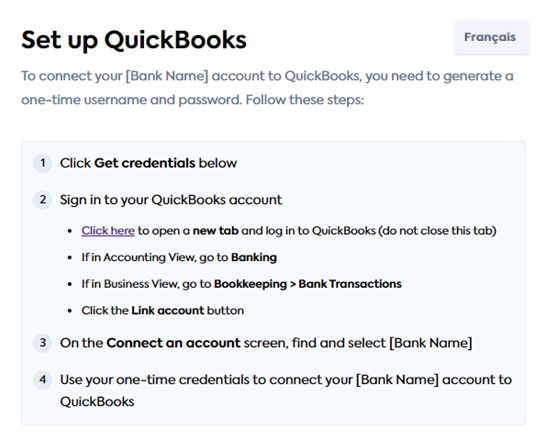
In response, you will receive login credentials that your user needs to enter in QBO Banking to linkLink The authorization flow that allows end users to connect their accounting, banking, or commerce platforms to your application via Codat. a bank account. Share them with the user, and consider providing instructions on steps to take in QBO. For example, this is how we manage it in our QBO LinkLink The authorization flow that allows end users to connect their accounting, banking, or commerce platforms to your application via Codat. flow:
- C#
- TypeScript
- Python
- Go
var credentialsRes = await bankFeedsClient.SourceAccounts.GenerateCredentialsAsync(new GenerateCredentialsRequest() {
    CompanyId = companyCreatedRes.Company.Id,
    ConnectionId = connectionCreatedRes.Connection.Id,
});

var companyCredentials = credentialsRes.BankAccountCredentials;
logger.LogInformation("{Username} {Password}", companyCredentials.Username, companyCredentials.Password);
bankFeedsClient.sourceAccounts.generateCredentials({
  companyId: companyCreatedRes.company.id,
  connectionId: connectionCreatedRes.connection.id,
}).then((credentialsRes: GenerateCredentialsResponse) => {
  if (credentialsRes.statusCode == 200) {
    const companyCredentials = credentialsRes.BankAccountCredentials;
    console.log(companyCredentials.username, companyCredentials.password)
  }
});
credentials_res = bank_feeds_client.source_accounts.generate_credentials(
    operations.GenerateCredentialsRequest(
        company_id=company_created_res.company.id,
        connection_id=connection_created_res.connection.id
    ))

company_credentials = credentials_res.bank_account_credentials
print(company_credentials.username, company_credentials.password)
ctx := context.Background()
credentialsRes, err := bankFeedsClient.SourceAccounts.GenerateCredentials(ctx, operations.GenerateCredentialsRequest{
    CompanyID: companyCreatedRes.Company.ID,
    ConnectionID: connectionCreatedRes.Connection.ID,
})

if err != nil {
    log.Fatal(err)
}

if credentialsRes.BankAccountCredentials != nil {
    // handle response
    companyCredentials := credentialsRes.BankAccountCredentials
    fmt.Println("%s %s", companyCredentials.Username, companyCredentials.Password)
}
When completing the authorization in QBO Banking, your user chooses the bank accounts they want to connect. At the same time, they also choose a feed_start_date value that is then used to limit the load of historic transactions to seven days.
Once this is complete, you can syncSync The process of fetching the latest data from a connected data source. Syncs can be triggered manually or run automatically on a schedule. transactions between the bank and Codat. QBO will then poll Codat periodically to read these transactions to their bank feed.
SyncSync The process of fetching the latest data from a connected data source. Syncs can be triggered manually or run automatically on a schedule. bank feedsBank Feeds A Codat product that enables automatic synchronization of bank transaction data into a company's accounting software. bank transactions
- You can write historic (back-dated) transactions that are up to seven days old based on the
feed_start_date, as chosen by the SMBSMB The primary customer segment that Codat helps businesses serve, typically companies with annual revenues under $500 million. user in the QBO UI. - Syncing future-dated transactions to QBO is not supported.
- You can only syncSync The process of fetching the latest data from a connected data source. Syncs can be triggered manually or run automatically on a schedule. bank transactions from one connected account at a time.
- Bank transactions must be synced in chronological order (from earliest to latest) based on the
cleared_on_date. - Bank transactions can't be older than the most recent transaction available on the destination bank account.
- Up to 1000 bank transactions can be synced at a time.
Use the Create bank transactions endpoint to post your SMBSMB The primary customer segment that Codat helps businesses serve, typically companies with annual revenues under $500 million. user's bank transactions to Codat.
Because of the way bank transactions work, we recommend you post seven days of transactions on the initial syncSync The process of fetching the latest data from a connected data source. Syncs can be triggered manually or run automatically on a schedule.. For subsequent syncsSync The process of fetching the latest data from a connected data source. Syncs can be triggered manually or run automatically on a schedule., we recommend you post daily transaction data.
- C#
- TypeScript
- Python
- Go
var res = await bankFeedsClient.Transactions.CreateAsync(new CreateBankTransactionsRequest() {
    CreateBankTransactions = new CreateBankTransactions() {
        AccountId = accountCreatedRes.Account.Id,
        Transactions = new List<CreateBankTransaction>() {
            new CreateBankTransaction() {
                Amount=2088.76M,
                Date="2022-10-23T00:00:00.000Z",
                Description="HSBC Covent Grdn ATM W",
                Id = "fa946773-9251-4aa5-ac3f-5ad019da1ffe",
            },
            new CreateBankTransaction() {
                Amount=4686.51M,
                Date="2022-10-23T00:00:00.000Z",
                Description="Forbes subscription",
                Id = "097b0074-f154-471b-9e6e-13b99d488e1e",
            },
            new CreateBankTransaction() {
                Amount=5759.47M,
                Date="2022-10-23T00:00:00.000Z",
                Description="Wholesale Balloons, Ltd",
                Id = "450ad2ab-d442-4698-82d5-02a94bb4f63c",
            },
        },
    },
    AccountId = accountCreatedRes.Account.Id,
    CompanyId = companyCreatedRes.Company.Id,
    ConnectionId = connectionCreatedRes.Connection.Id,
});
bankFeedsClient.transactions.create({
  createBankTransactions: {
    accountId: accountCreatedRes.account.id,
    transactions: [
        {
            amount: 2088.76,
            date: "2022-10-23T00:00:00.000Z",
            description: "HSBC Covent Grdn ATM W",
            id: "fa946773-9251-4aa5-ac3f-5ad019da1ffe",
        },
        {
            amount: 4686.51,
            date: "2022-10-23T00:00:00.000Z",
            description: "Forbes subscription",
            id: "097b0074-f154-471b-9e6e-13b99d488e1e",
        },
        {
            amount: 5759.47,
            date: "2022-10-23T00:00:00.000Z",
            description: "Wholesale Balloons, Ltd",
            id: "450ad2ab-d442-4698-82d5-02a94bb4f63c",
        },
    ],
  },
  accountId: accountCreatedRes.account.id,
  companyId: companyCreatedRes.company.id,
  connectionId: connectionCreatedRes.connection.id,
}).then((res: CreateBankTransactionsResponse) => {
  if (res.statusCode == 200) {
    // handle response
  }
});
req = operations.CreateBankTransactionsRequest(
    create_bank_transactions=shared.CreateBankTransactions(
        account_id=account_created_res.account.id,
        transactions=[
            shared.CreateBankTransaction(
                amount=2088.76,
                date_='2022-10-23T00:00:00.000Z',
                description='HSBC Covent Grdn ATM W',
                id='fa946773-9251-4aa5-ac3f-5ad019da1ffe',
            ),
            shared.CreateBankTransaction(
                amount=4686.51,
                date_='2022-10-23T00:00:00.000Z',
                description='Forbes subscription',
                id='097b0074-f154-471b-9e6e-13b99d488e1e',
            ),
            shared.CreateBankTransaction(
                amount=5759.47,
                date_='2022-10-23T00:00:00.000Z',
                description='Wholesale Balloons, Ltd',
                id='450ad2ab-d442-4698-82d5-02a94bb4f63c',
            ),
        ],
    ),
    account_id=account_created_res.account.id,
    company_id=company_created_res.company.id,
    connection_id=connection_created_res.connection.id
)

res = bank_feeds_client.transactions.create(req)
ctx := context.Background()
res, err := bankFeedsClient.Transactions.Create(ctx, operations.CreateBankTransactionsRequest{
    CreateBankTransactions: &shared.CreateBankTransactions{
        AccountID: accountCreatedRes.Account.ID,
        Transactions: []shared.CreateBankTransaction{
            shared.CreateBankTransaction() {
                Amount: codatbankfeeds.Float64(2088.76M),
                Date: codatbankfeeds.String("2022-10-23T00:00:00.000Z"),
                Description: codatbankfeeds.String("HSBC Covent Grdn ATM W"),
                Id: codatbankfeeds.String("fa946773-9251-4aa5-ac3f-5ad019da1ffe"),
            },
            shared.CreateBankTransaction() {
                Amount: codatbankfeeds.Float64(4686.51M),
                Date: codatbankfeeds.String("2022-10-23T00:00:00.000Z"),
                Description: codatbankfeeds.String("Forbes subscription"),
                Id: codatbankfeeds.String("097b0074-f154-471b-9e6e-13b99d488e1e"),
            },
            shared.CreateBankTransaction() {
                Amount: codatbankfeeds.Float64(5759.47M),
                Date: codatbankfeeds.String("2022-10-23T00:00:00.000Z"),
                Description: codatbankfeeds.String("Wholesale Balloons, Ltd"),
                Id: codatbankfeeds.String("450ad2ab-d442-4698-82d5-02a94bb4f63c"),
            },
        },
    },
    AccountID: accountCreatedRes.Account.ID,
    CompanyID:companyCreatedRes.Company.ID,
    ConnectionID: connectionCreatedRes.Connection.ID,
})
Repeat the request for the remainder of the SMBSMB The primary customer segment that Codat helps businesses serve, typically companies with annual revenues under $500 million. user's source bank accounts. Keep the bank transactions in Codat up to date, as QBO polls Codat periodically to read these transactions to their bank feedsBank Feeds A Codat product that enables automatic synchronization of bank transaction data into a company's accounting software..
That's it - you have followed Codat's bank transactions reconciliation process flow and understood how to implement it in code. You can now use this tutorial as a basis for your application.
Read next
- Expand your coverage of bank feedsBank Feeds A Codat product that enables automatic synchronization of bank transaction data into a company's accounting software. to Xero and Sage
- Learn more about how Codat can automate your lending solutions on the examples of loan qualification and invoice financing