Configure customer in Codat
Create a company, its connection, and a source account that form the structure required to establish a bank feed
Overview
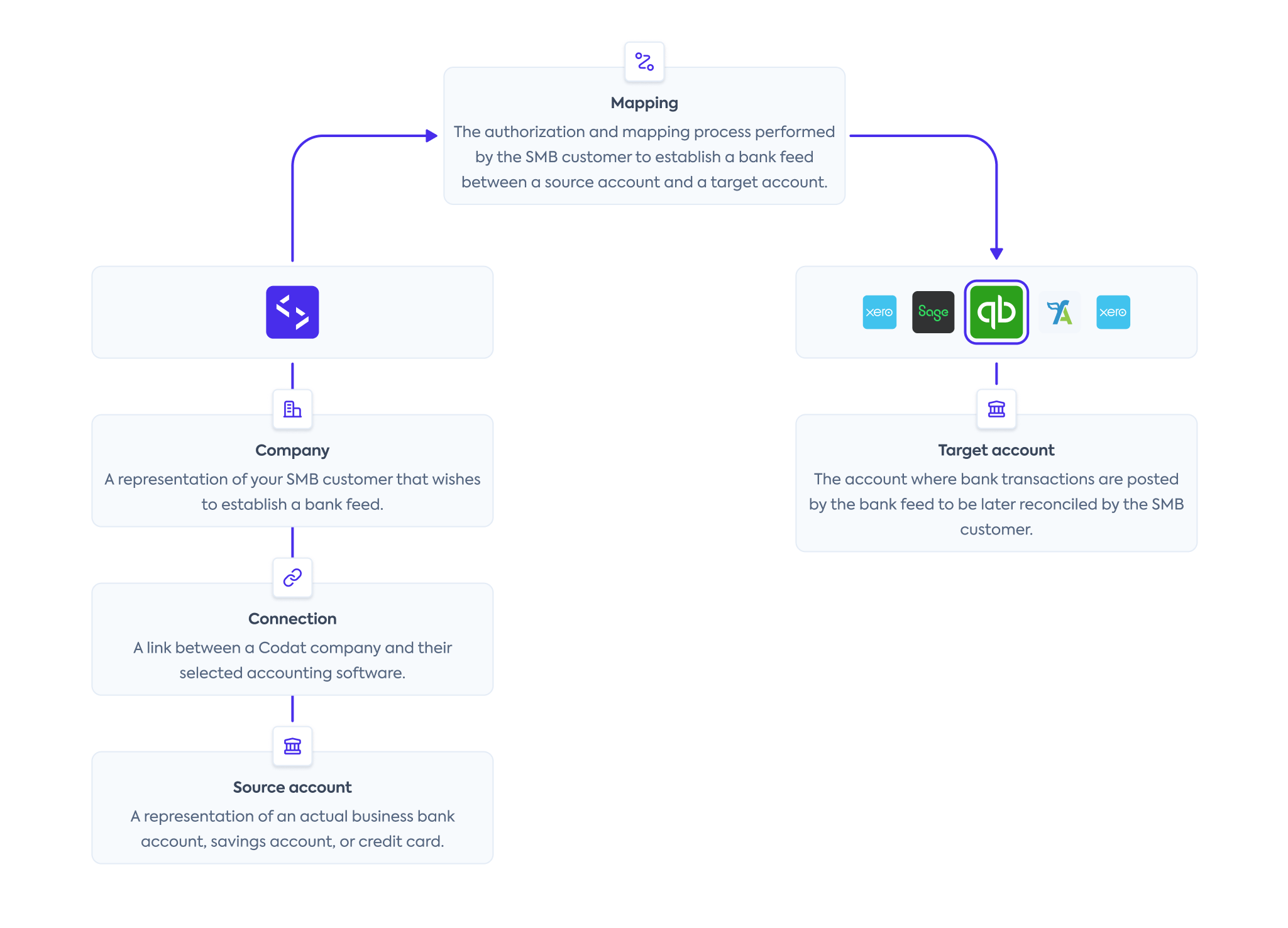
When implementing your bank feed solution, you need to create your customer as a company in Codat before registering their accounting software as a connectionConnection A link between a Codat company and a data source (like an accounting platform). Each connection represents authorized access to pull or push data from that platform. and creating a source account to represent the companyCompany In Codat, a company represents your customer's business entity. Companies can have multiple connections to different data sources.'s actual bank account.
You can see how these elements fit together and where they sit in the overall bank feedsBank Feeds A Codat product that enables automatic synchronization of bank transaction data into a company's accounting software. process on the diagram below.
Remember to authenticate when making calls to our APIAPI A set of rules and protocols that allows different software applications to communicate with each other. Codat provides APIs for accessing financial data from accounting, banking, and commerce platforms.. Navigate to Developers > APIAPI A set of rules and protocols that allows different software applications to communicate with each other. Codat provides APIs for accessing financial data from accounting, banking, and commerce platforms. keys in the Portal to pick up your authorization header.
Create a companyCompany In Codat, a company represents your customer's business entity. Companies can have multiple connections to different data sources.
Within Bank FeedsBank Feeds A Codat product that enables automatic synchronization of bank transaction data into a company's accounting software., a companyCompany In Codat, a company represents your customer's business entity. Companies can have multiple connections to different data sources. represents your SMBSMB The primary customer segment that Codat helps businesses serve, typically companies with annual revenues under $500 million. customer that wishes to export their transactions from your application to their accounting software.
Use the Create company endpoint to represent your customer in Codat. Make sure to store the companyCompany In Codat, a company represents your customer's business entity. Companies can have multiple connections to different data sources. ID as you will use it to establish a connectionConnection A link between a Codat company and a data source (like an accounting platform). Each connection represents authorized access to pull or push data from that platform. to an accounting software.
- TypeScript
- Python
- C#
- Go
const companyResponse = bankFeedsClient.companies.create({
  name: companyName,
});

if (companyResponse.statusCode == 200) {
  throw new Error("Could not create company");
}

const companyId = companyResponse.company.id;
console.log(companyId);
company_request = shared.CompanyRequestBody(
    name=company_name,
)

company_response = bank_feeds_client.companies.create(company_request)

if company_response.status_code != 200:
  raise Exception('Could not create company')

company_id = company_response.company.id
print(company_id)
var companyResponse = await bankFeedsClient.Companies.CreateAsync(new() {
    Name = companyName,
});

if(companyResponse.StatusCode != 200){
  throw new Exception("Could not create company");
}

var companyId = companyResponse.Company.Id;
console.log(companyId)
ctx := context.Background()
companyResponse, err := bankFeedsClient.Companies.Create(ctx, &shared.CompanyRequestBody{
  Name: companyName,
	})

if companyResponse.StatusCode == 200 {
  companyID := companyResponse.Company.ID
  fmt.Println("%s", companyID)
}
Create a connectionConnection A link between a Codat company and a data source (like an accounting platform). Each connection represents authorized access to pull or push data from that platform.
Next, use the Create connection endpoint to connect the companyCompany In Codat, a company represents your customer's business entity. Companies can have multiple connections to different data sources. to an accounting data sourceData source An external platform (such as QuickBooks, Xero, or a bank) that Codat integrates with to pull or push financial data. via one of our integrations. This will allow you to synchronize data with that source.
In the request body, specify a platformKey of the accounting software you're looking to connect.
| Accounting software | platformKey |
|---|---|
| QuickBooks Online Bankfeeds | hcws |
| Oracle NetSuite | akxx |
| Xero | gbol |
| FreeAgent | fbrh |
| Sage bank feedsBank Feeds A Codat product that enables automatic synchronization of bank transaction data into a company's accounting software. | olpr |
As an example, let's create a QuickBooks Online (QBO) connectionConnection A link between a Codat company and a data source (like an accounting platform). Each connection represents authorized access to pull or push data from that platform.. In response, the endpoint returns a dataConnection object with a PendingAuth status and a linkUrl. Direct your customer to the linkUrl to initiate our Link auth flow and enable them to authorize this connectionConnection A link between a Codat company and a data source (like an accounting platform). Each connection represents authorized access to pull or push data from that platform..
- TypeScript
- Python
- C#
- Go
const connectionResponse = bankFeedsClient.connections.create({
  requestBody: {
    platformKey: "hcws",
  },
  companyId: companyResponse.company.id,
});

console.log(connectionResponse.connection.linkUrl);
connection_request = operations.CreateConnectionRequest(
    request_body=operations.CreateConnectionRequestBody(
        platform_key='hcws',
    ),
    company_id=company_response.company.id,
)

connection_response = bank_feeds_client.connections.create(connection_request)

console.log(connection_response.connection.link_url)
var connectionResponse = await bankFeedsClient.Connections.CreateAsync(new() {
    RequestBody = new CreateConnectionRequestBody() {
        PlatformKey = "hcws",
    },
    CompanyId = companyResponse.Company.Id,
});

Console.WriteLine(connectionResponse.Connection.LinkUrl)
ctx := context.Background()
connectionResponse, err := bankFeedsClient.Connections.Create(ctx, operations.CreateConnectionRequest{
    RequestBody: &operations.CreateConnectionRequestBody{
        PlatformKey: bankfeeds.String("hcws"),
    },
    CompanyID: companyResponse.Company.ID,
})

fmt.Println(connectionResponse.Connection.LinkUrl)
For QBO, the linkUrl contains a one-time password (OTP) that expires after one hour. If the OTP has expired, your customer will receive a 401 error when loading the page. Generate a new OTP by calling the Get connection endpoint.
View code snippets
- TypeScript
- Python
- C#
- Go
const connectionOtpResponse = bankFeedsClient.connections.get({
  companyId: companyResponse.company.id,
  connectionId: connectionResponse.connection.id,
});

console.log(connectionOtpResponse.connection.linkUrl);
connection_otp_request = operations.GetConnectionRequest(
    company_id=company_response.company.id,
    connection_id=connection_response.connection.id,
)

connection_otp_response = bank_feeds_client.connections.get(connection_otp_request)

console.log(connection_otp_response.connection.link_url)
var connectionOtpResponse = await bankFeedsClient.Connections.GetAsync(new() {
    CompanyId = companyResponse.Company.Id,
    ConnectionId = connectionResponse.Connection.Id,
});

Console.WriteLine(connectionOtpResponse.Connection.LinkUrl)
ctx := context.Background()
connectionOtpResponse, err := bankFeedsClient.Connections.Get(ctx, operations.GetConnectionRequest{
    CompanyID: companyResponse.Company.ID,
    ConnectionID: connectionResponse.Connection.ID,
})

fmt.Println(connectionOtpResponse.Connection.LinkUrl)
Deauthorize a connectionConnection A link between a Codat company and a data source (like an accounting platform). Each connection represents authorized access to pull or push data from that platform.
If your customer wants to revoke their approval and sever the connectionConnection A link between a Codat company and a data source (like an accounting platform). Each connection represents authorized access to pull or push data from that platform. to their accounting software, use the Unlink connection endpoint.
You can learn more about connectionConnection A link between a Codat company and a data source (like an accounting platform). Each connection represents authorized access to pull or push data from that platform. management best practices and see how you can provide this functionality in your app's UI.
- TypeScript
- Python
- C#
- Go
const unlinkResponse = bankFeedsClient.connections.unlink({
  requestBody: {
    status: DataConnectionStatus.Unlinked,
  },
  companyId: companyResponse.company.id,
  connectionId: connectionResponse.connection.id,
});
unlink_request = operations.UnlinkConnectionRequest(
    request_body=operations.UnlinkConnectionUpdateConnection(
      status=shared.DataConnectionStatus.UNLINKED
    ),
    company_id=company_response.company.id,
    connection_id=connection_response.connection.id,
)

unlink_response = bank_feeds_client.connections.unlink(req)
var unlinkResponse = await bankFeedsClient.Connections.UnlinkAsync(new() {
    RequestBody = new UnlinkConnectionUpdateConnection() {
      Status = DataConnectionStatus.Unlinked
    },
    CompanyId = companyResponse.Company.Id,
    ConnectionId = connectionResponse.Connection.Id,
});
ctx := context.Background()
unlinkResponse, err := bankFeedsClient.Connections.Unlink(ctx, operations.UnlinkConnectionRequest{
    RequestBody: &operations.UnlinkConnectionUpdateConnection{
      Status: shared.DataConnectionStatusUnlinked
    },
    CompanyID: companyResponse.Company.ID,
    ConnectionID: connectionResponse.Connection.ID,
})
Create a source account
Finally, create a source account using our Create source account endpoint. It represents the companyCompany In Codat, a company represents your customer's business entity. Companies can have multiple connections to different data sources.'s actual financial account, savings account or credit card within Codat. We categorize accounts as a credit or a debit account type for standardization.
If you require several source bank accounts, simply use the same endpoint to create additional accounts for the existing accounting connectionConnection A link between a Codat company and a data source (like an accounting platform). Each connection represents authorized access to pull or push data from that platform..
As an example, let's create a debit account. If the source account passes validation, you will receive a synchronous response with a 200 status code indicating a successful operation.
For bank accounts in GBP, sortCode is also a required field.
- TypeScript
- Python
- C#
- Go
- Java
const sourceAccountResponse = bankFeedsClient.sourceAccounts.create({
  sourceAccount: {
    id: "ac-001",
    accountName: "Checking Account",
    accountType: "checking",
    accountNumber: "01120912",
    currency: "USD",
    balance: 4002,
  },
  companyId: companyResponse.company.id,
  connectionId: connectionResponse.connection.id,
});
source_account_request = operations.CreateSourceAccountRequest(
    id="ac-001",
    accountName="Checking Account",
    accountType=AccountType.CHECKING,
    accountNumber="01120912",
    currency="USD",
    balance=4002
  ),
  company_id=company_response.company.id,
  connection_id=connection_response.connection.id
)

source_account_response = bank_feeds_client.source_accounts.create(req)
var sourceAccountResponse = await bankFeedsClient.SourceAccounts.CreateAsync(new() {
    SourceAccount = new SourceAccount() {
      Id = "ac-001",
      AccountName = "Checking Account",
      AccountType = AccountType.Checking,
      AccountNumber = "01120912",
      Currency = "USD",
      Balance = 4002
    },
    CompanyId = companyResponse.Company.Id,
    ConnectionId = connectionResponse.Connection.Id
});
ctx := context.Background()
sourceAccountResponse, err := bankFeedsClient.SourceAccounts.Create(ctx, operations.CreateSourceAccountRequest{
    SourceAccount: &shared.SourceAccount{
      ID: bankfeeds.String("ac-001"),
      AccountName: bankfeeds.String("Checking Account"),
      AccountType: shared.AccountTypeChecking,
      AccountNumber: bankfeeds.String("01120912"),
      Currency: bankfeeds.String("USD"),
      Balance: 4002
    },
    CompanyID: companyResponse.Company.ID,
    ConnectionID: connectionResponse.Connection.ID
})
CreateSourceAccountRequest req = CreateSourceAccountRequest.builder()
    .requestBody(CreateSourceAccountRequestBody.of(SourceAccountV2.builder()
        .id("ac-001")
        .accountName("Checking Account")
        .accountType(AccountType.LOAN)
        .accountNumber("01120912")
        .currency("USD")
        .balance(new BigDecimal("4002"))
        .build()))
    .companyId(companyId)
    .connectionId(connectionId)
    .build();

CreateSourceAccountResponse res = bankFeedsClient.sourceAccounts().create()
    .request(req)
    .call();
Once the source account is successfully created, guide your customer through the mapping process to associate it with a corresponding target account in their accounting software. The account will stay in a pending status until that happens, and it must change to linked before you can successfully transmit any bank transactions.
Multi-currency accounts
You can create multiple accounts in different currencies using the same Create source account endpoint for the companyCompany In Codat, a company represents your customer's business entity. Companies can have multiple connections to different data sources. and the connectionConnection A link between a Codat company and a data source (like an accounting platform). Each connection represents authorized access to pull or push data from that platform.. If the user has not enabled multi-currency in their accounting software, you will receive an error message which you can display to the user.
Update a source account
You may need to modify a source account before the mapping is finalized. For example, your customer might want a bank account name to appear in their accounting software. To do that, use the Update source account endpoint.
- TypeScript
- Python
- C#
- Go
const sourceAccountUpdateResponse = bankFeedsClient.sourceAccounts.update({
  sourceAccount: {
    id: "ac-001",
    accountName: "Bank of Dave Checking Account",
    accountType: "checking",
    accountNumber: "01120912",
    currency: "USD",
    balance: 4002,
  },
  accountId: sourceAccountResponse.sourceAccount.id,
  companyId: companyResponse.company.id,
  connectionId: connectionResponse.connection.id,
});
source_account_update_request = operations.UpdateSourceAccountRequest(
  source_account=shared.SourceAccount(
    id="ac-001",
    accountName="Bank of Dave Checking Account",
    accountType=AccountType.CHECKING,
    accountNumber="01120912",
    currency="USD",
    balance=4002
  ),
  account_id=source_account_response.source_account.id,
  company_id=company_response.company.id,
  connection_id=connection_response.connection.id
)

res = bank_feeds_client.source_accounts.update(source_account_update_request)
var sourceAccountUpdateResponse = await sdk.SourceAccounts.UpdateAsync(new() {
    SourceAccount = new SourceAccount() {
        Id = "ac-001",
        AccountName = "Checking Account",
        AccountType = AccountType.Checking,
        AccountNumber = "01120912",
        Currency = "USD",
        Balance = 4002
    },
    AccountId = sourceAccountResponse.SourceAccount.Id,
    CompanyId = companyResponse.Company.Id,
    ConnectionId = connectionResponse.Connection.Id
});
ctx := context.Background()
res, err := bankFeedsClient.SourceAccounts.Update(ctx, operations.UpdateSourceAccountRequest{
    SourceAccount: &shared.SourceAccount{
        ID: bankfeeds.String("ac-001"),
        AccountName: bankfeeds.String("Checking Account"),
        AccountType: shared.AccountTypeChecking,
        AccountNumber: bankfeeds.String("01120912"),
        Currency: bankfeeds.String("USD"),
        Balance: 4002
    },
    AccountID: sourceAccountResponse.SourceAccount.ID,
    CompanyID: companyResponse.Company.ID,
    ConnectionID: connectionResponse.Connection.ID
})
Remove a source account
If your customer decides to close their account, you can also remove it from Codat using the Delete source account endpoint. This will not delete the account from your customer's accounting software, but it will disable the bank feed, preventing any new transactions from appearing.
- TypeScript
- Python
- C#
- Go
const sourceAccountDeleteResponse = bankFeedsClient.sourceAccounts.delete({
  accountId: sourceAccountResponse.sourceAccount.id,
  companyId: companyResponse.company.id,
  connectionId: connectionResponse.connection.id,
});
source_account_delete_request = operations.DeleteSourceAccountRequest(
  account_id=source_account_response.source_account.id,
  company_id=company_response.company.id,
  connection_id=connection_response.connection.id
)

res = bank_feeds_client.source_accounts.delete(source_account_delete_request)
var res = await bankFeedsClient.SourceAccounts.DeleteAsync(new() {
    AccountId = sourceAccountResponse.SourceAccount.Id,
    CompanyId = companyResponse.Company.Id,
    ConnectionId = connectionResponse.Connection.Id
});
ctx := context.Background()
res, err := bankFeedsClient.SourceAccounts.Delete(ctx, operations.DeleteSourceAccountRequest{
    AccountID: sourceAccountResponse.SourceAccount.ID,
    CompanyID: companyResponse.Company.ID,
    ConnectionID: connectionResponse.Connection.ID
})
You have created the structure of key objects required by Codat's Bank FeedsBank Feeds A Codat product that enables automatic synchronization of bank transaction data into a company's accounting software. solution: a companyCompany In Codat, a company represents your customer's business entity. Companies can have multiple connections to different data sources., its connectionConnection A link between a Codat company and a data source (like an accounting platform). Each connection represents authorized access to pull or push data from that platform. to an accounting data sourceData source An external platform (such as QuickBooks, Xero, or a bank) that Codat integrates with to pull or push financial data., and a source account.
Next, provide your customer with a mapping process interface so they can associate the source account with a target account in their accounting software.
Read next
- Enable your customer to map accounts to their accounting software via a mapping UI.