Custom data types
Leverage existing integrations to fetch data types not included in Codat's out-of-the box data model
Request guidance from your Codat contact if you want to implement this feature of our APIAPI A set of rules and protocols that allows different software applications to communicate with each other. Codat provides APIs for accessing financial data from accounting, banking, and commerce platforms..
What are custom data types?
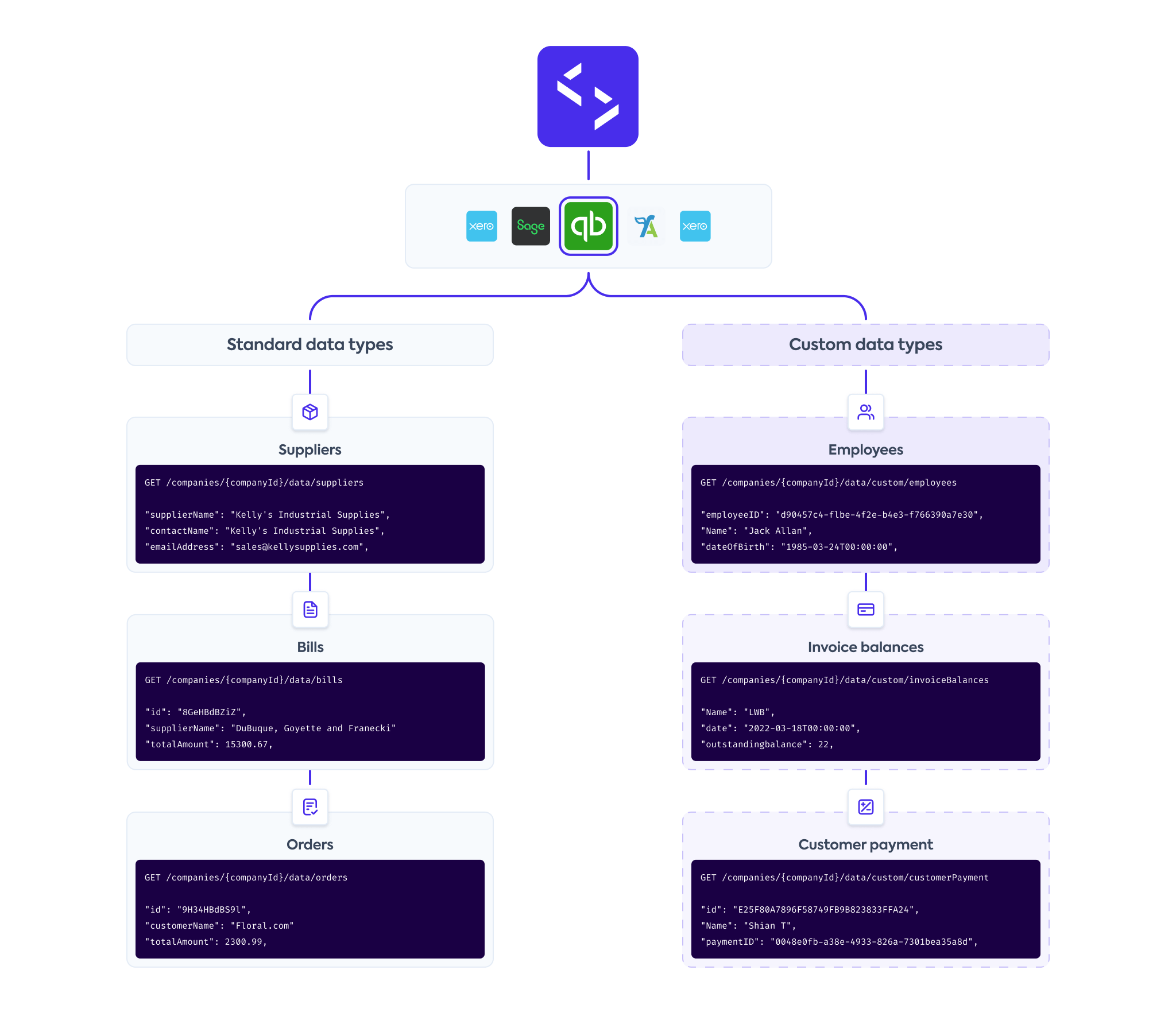
Codat's standard data models leverage our extensive industry experience and knowledge, which we used to identify and standardize a multitude of data types that best support your business.
However, your use case may require additional data types from our integrations that are excluded from our standard model. For example, we do not currently fetch any data from Xero's Payroll and NetSuite's Expense Reports endpoints.
With custom data, you can fetch new, non-standardized data types that are not included in our out-of-the-box data model for the integrations we support. You will need to configure and request these custom data types using our APIAPI A set of rules and protocols that allows different software applications to communicate with each other. Codat provides APIs for accessing financial data from accounting, banking, and commerce platforms. endpoints.
Are you looking to fetch, create, or update additional properties in data types already supported by Codat's standardized data model? You might need to use supplemental data instead.
Supported integrations
Configure custom data
Create new custom data type
Use our Configure custom data type endpoint to create a new data type for each integration you require. Keep these guidelines in mind:
- You can only indicate a single data sourceData source An external platform (such as QuickBooks, Xero, or a bank) that Codat integrates with to pull or push financial data. for each custom data type.
- It is not possible to specify nested objects or arrays within the
requiredDataproperty. - You can query the underlying platform's APIAPI A set of rules and protocols that allows different software applications to communicate with each other. Codat provides APIs for accessing financial data from accounting, banking, and commerce platforms. by specifying the query as part of the
dataSourceproperty.
We advise you make your custom configuration as similar as possible to our standard data types so you can interact with them in exactly the same way.
- Request
- Example
PUT /integrations/{platformKey}/datatypes/custom/{customDataIdentifier}
{
"dataSource": "{endpointFromUnderlyingPlatform}",//required
"requiredData": {
"{nameYourField}": "$.{fieldNameFromUnderlyingPlatform}",
"{nameYourField}": "$.{fieldNameFromUnderlyingPlatform}"
},
"keyBy": [“$.{fieldNameFromUnderlyingPlatform}”],//required
"sourceModifiedDate": ["{fieldNameFromUnderlyingPlatform}"]
}
PUT /integrations/qhyg/datatypes/custom/qbo-cashflow-report

{
    "dataSource": "/reports/CashFlow",
    "requiredData": {
        "Heads": "$.Header.EndPeriod",
        "Header": "$.Header",
        "Rows": "$.Rows",
        "Columns": "$.Columns"
    },
    "keyBy": ["$.Header.ReportName"],
    "sourceModifiedDate": ["$.Header.Time"]
}
Codat does not validate any of the values you enter in the configuration request. If you misspell values or don't specify the full APIAPI A set of rules and protocols that allows different software applications to communicate with each other. Codat provides APIs for accessing financial data from accounting, banking, and commerce platforms. routes, you will receive a fetch error when trying to read the custom data type later.
Refer to the platform's own APIAPI A set of rules and protocols that allows different software applications to communicate with each other. Codat provides APIs for accessing financial data from accounting, banking, and commerce platforms. documentation to make sure you are using the correct endpoint, route, and field names.
Update existing configuration
Once you configured a custom data type, you can't change its customDataIdentifier. However, you can update the data type's content using the Configure custom data type endpoint.
View existing configuration
You can view previously created configurations for a specific platform using the following endpoint:
- Get custom data configuration returns the configuration of the specified custom data type for the platform you indicate in
platformKey.
Test your configuration
It's not possible to test custom data types in the Codat Sandbox. Instead, create a test companyCompany In Codat, a company represents your customer's business entity. Companies can have multiple connections to different data sources. with a data connectionConnection A link between a Codat company and a data source (like an accounting platform). Each connection represents authorized access to pull or push data from that platform. to an integration and trial different configuration options.
SyncSync The process of fetching the latest data from a connected data source. Syncs can be triggered manually or run automatically on a schedule. and view custom data
Custom data configuration is created for a specific platform, so you can only queue a custom data type syncSync The process of fetching the latest data from a connected data source. Syncs can be triggered manually or run automatically on a schedule. for connectionsConnection A link between a Codat company and a data source (like an accounting platform). Each connection represents authorized access to pull or push data from that platform. that use that platform as a source. Use the Refresh custom data type endpoint to do so:
POST /companies/{companyId}/connections/{connectionId}/data/queue/custom/{customDataIdentifier}
Requests to our Refresh all data endpoint do not trigger a syncSync The process of fetching the latest data from a connected data source. Syncs can be triggered manually or run automatically on a schedule. for any of the custom datasets.
To view synced custom data, use the List custom data type records endpoint. You must specify a page number in the request.
GET /companies/{companyId}/connections/{connectionId}/data/custom/{customDataIdentifier}?page=1
To view the read history for your custom data types, use the following endpoints. In the response, dataType property will reflect the custom data type as custom/{customDataIdentifier}:
- List pull operations to view the companyCompany In Codat, a company represents your customer's business entity. Companies can have multiple connections to different data sources.'s read history for all of its data types
- Get pull operation to view information about a single specific dataset
💡 Tips and traps
-
Custom data types can be used at record and line item level, but only support fetch operations.
-
Custom data types only support JSON responses from the integrations' APIsAPI A set of rules and protocols that allows different software applications to communicate with each other. Codat provides APIs for accessing financial data from accounting, banking, and commerce platforms..
-
Codat's querying functionality doesn't support custom data types, but you can include URL parameters that are accepted by the underlying platform in the
dataSourceof your custom data type configuration. -
Codat's Fetch on first link functionality doesn't support custom data types.