Configure customer in Codat
Create a company and its connection that form the structure required to execute the expense sync process
Overview
When implementing your Expenses solution, you need to create your SMBSMB The primary customer segment that Codat helps businesses serve, typically companies with annual revenues under $500 million. customer as a company in Codat before registering their accounting software as a connectionConnection A link between a Codat company and a data source (like an accounting platform). Each connection represents authorized access to pull or push data from that platform.. You can do that when the customer starts interacting with your application.
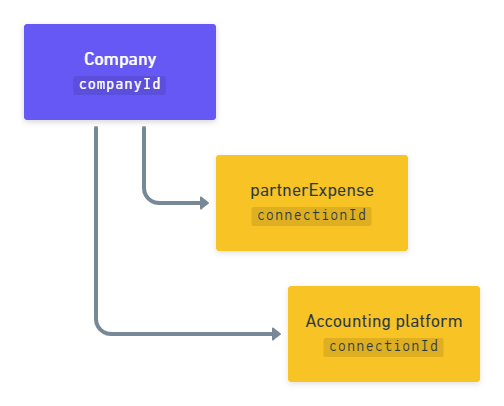
Next, you will connect the companyCompany In Codat, a company represents your customer's business entity. Companies can have multiple connections to different data sources. to a data sourceData source An external platform (such as QuickBooks, Xero, or a bank) that Codat integrates with to pull or push financial data. via one of our integrations. With Expenses, each companyCompany In Codat, a company represents your customer's business entity. Companies can have multiple connections to different data sources. will have two data connectionsConnection A link between a Codat company and a data source (like an accounting platform). Each connection represents authorized access to pull or push data from that platform.: one to the SMBSMB The primary customer segment that Codat helps businesses serve, typically companies with annual revenues under $500 million.'s accounting software, and another one - to the partner expense integration, i.e. your application.
Remember to authenticate when making calls to our APIAPI A set of rules and protocols that allows different software applications to communicate with each other. Codat provides APIs for accessing financial data from accounting, banking, and commerce platforms.. Navigate to Developers > APIAPI A set of rules and protocols that allows different software applications to communicate with each other. Codat provides APIs for accessing financial data from accounting, banking, and commerce platforms. keys in the Portal to pick up your authorization header.
Create a companyCompany In Codat, a company represents your customer's business entity. Companies can have multiple connections to different data sources.
Within Expenses, a companyCompany In Codat, a company represents your customer's business entity. Companies can have multiple connections to different data sources. represents your SMBSMB The primary customer segment that Codat helps businesses serve, typically companies with annual revenues under $500 million. customer that manages their expenses using your application. To create it, use our Create company endpoint. It returns a JSON response containing the companyCompany In Codat, a company represents your customer's business entity. Companies can have multiple connections to different data sources. id. You will use this id to establish a connectionConnection A link between a Codat company and a data source (like an accounting platform). Each connection represents authorized access to pull or push data from that platform. to an accounting software.
- HTTP
Create accounting connectionConnection A link between a Codat company and a data source (like an accounting platform). Each connection represents authorized access to pull or push data from that platform.
Next, use the Create connection endpoint to connect the companyCompany In Codat, a company represents your customer's business entity. Companies can have multiple connections to different data sources. to an accounting data sourceData source An external platform (such as QuickBooks, Xero, or a bank) that Codat integrates with to pull or push financial data. via one of our integrations. This will allow you to synchronize data with that source. In the request body, specify a platformKey of the accounting software you're looking to connect.
| Accounting software | platformKey |
|---|---|
| Dynamics 365 Business Central | trji |
| FreeAgent | fbrh |
| Oracle NetSuite | akxx |
| QuickBooks Desktop | pqsw |
| QuickBooks Online | qhyg |
| Xero | gbol |
As an example, let's create a QuickBooks Online (QBO) connectionConnection A link between a Codat company and a data source (like an accounting platform). Each connection represents authorized access to pull or push data from that platform.. In response, the endpoint returns a dataConnection object with a PendingAuth status and a linkUrl. Direct your customer to the linkUrl to initiate our Link auth flow and enable them to authorize this connectionConnection A link between a Codat company and a data source (like an accounting platform). Each connection represents authorized access to pull or push data from that platform..
- HTTP
Request
POST /companies/{companyId}/connections
{
    "platformKey": "qhyg"
}
Response
{
  "id": "7baba7cc-4ae0-48fd-a617-98d55a6fc008",
  "integrationId": "6b113e06-e818-45d7-977b-8e6bb3d01269",
  "sourceId": "56e6575a-3f1f-4918-b009-f7535555f0d6",
  "platformName": "QuickBooks Online",
  "linkUrl": "https://link-api.codat.io/companies/{companyId}/connections/{connectionId}/start?otp=742271",
  "status": "PendingAuth",
  "created": "2022-09-01T10:21:57.0807447Z",
  "sourceType": "Accounting"
}
Create partner expense connectionConnection A link between a Codat company and a data source (like an accounting platform). Each connection represents authorized access to pull or push data from that platform.
Once your customer has authorized access to their accounting software, you need to create another connectionConnection A link between a Codat company and a data source (like an accounting platform). Each connection represents authorized access to pull or push data from that platform. for their companyCompany In Codat, a company represents your customer's business entity. Companies can have multiple connections to different data sources. for the partner expense integration.
Use our Create partner expense connection to linkLink The authorization flow that allows end users to connect their accounting, banking, or commerce platforms to your application via Codat. the companyCompany In Codat, a company represents your customer's business entity. Companies can have multiple connections to different data sources. to your application. This connectionConnection A link between a Codat company and a data source (like an accounting platform). Each connection represents authorized access to pull or push data from that platform. is created with the Linked status, so you don't need to do anything else to authorize it.
Deauthorize a connectionConnection A link between a Codat company and a data source (like an accounting platform). Each connection represents authorized access to pull or push data from that platform.
If your customer wants to revoke their approval and sever the connectionConnection A link between a Codat company and a data source (like an accounting platform). Each connection represents authorized access to pull or push data from that platform. to their accounting software, use the Unlink connection endpoint.
You can learn more about connectionConnection A link between a Codat company and a data source (like an accounting platform). Each connection represents authorized access to pull or push data from that platform. management best practices and see how you can provide this functionality in your app's UI.
PATCH /companies/{companyId}/connections/{connectionId}
 {
 "status": "Unlinked"
 }
You have created the structure of key objects required by Codat's Expenses: a companyCompany In Codat, a company represents your customer's business entity. Companies can have multiple connections to different data sources. and its connectionsConnection A link between a Codat company and a data source (like an accounting platform). Each connection represents authorized access to pull or push data from that platform. to an accounting data sourceData source An external platform (such as QuickBooks, Xero, or a bank) that Codat integrates with to pull or push financial data. and your partner expense integration.
Next, learn how to configure the companyCompany In Codat, a company represents your customer's business entity. Companies can have multiple connections to different data sources. to associate the expenses with correct accounts, suppliers, and customers and enable your customers to indicate their preferred expense mapping options.